Choosing the Best Workflow Management Software for Enhanced Operational Efficiency
The rapid evolution of business environments, characterized by increasing project complexity, distributed teams, and the demand for accelerated delivery, has made the search for robust workflow management solutions more critical than ever. Organizations are increasingly turning to specialized software to map processes, streamline operations, and minimize inefficient handoffs. This comprehensive analysis explores a range of leading workflow management platforms, highlighting their unique strengths and optimal use cases for diverse business needs, from intricate agile development to visual task tracking and complex approval processes.
The Imperative of Streamlined Operations in Modern Business
In today’s fast-paced corporate landscape, the ability to manage workflows effectively is no longer a luxury but a fundamental necessity for competitive advantage. The digital transformation sweeping across industries has amplified the need for tools that can bring structure to chaos, provide transparency across teams, and automate repetitive tasks. From software development sprints to creative content pipelines and cross-departmental initiatives, the challenge lies in selecting a system that not only aligns with existing operational paradigms but also facilitates growth and adaptability. This assessment delves into platforms that excel in specific operational contexts, offering insights into how each can address distinct organizational requirements.
The Evolving Landscape of Workflow Management Tools
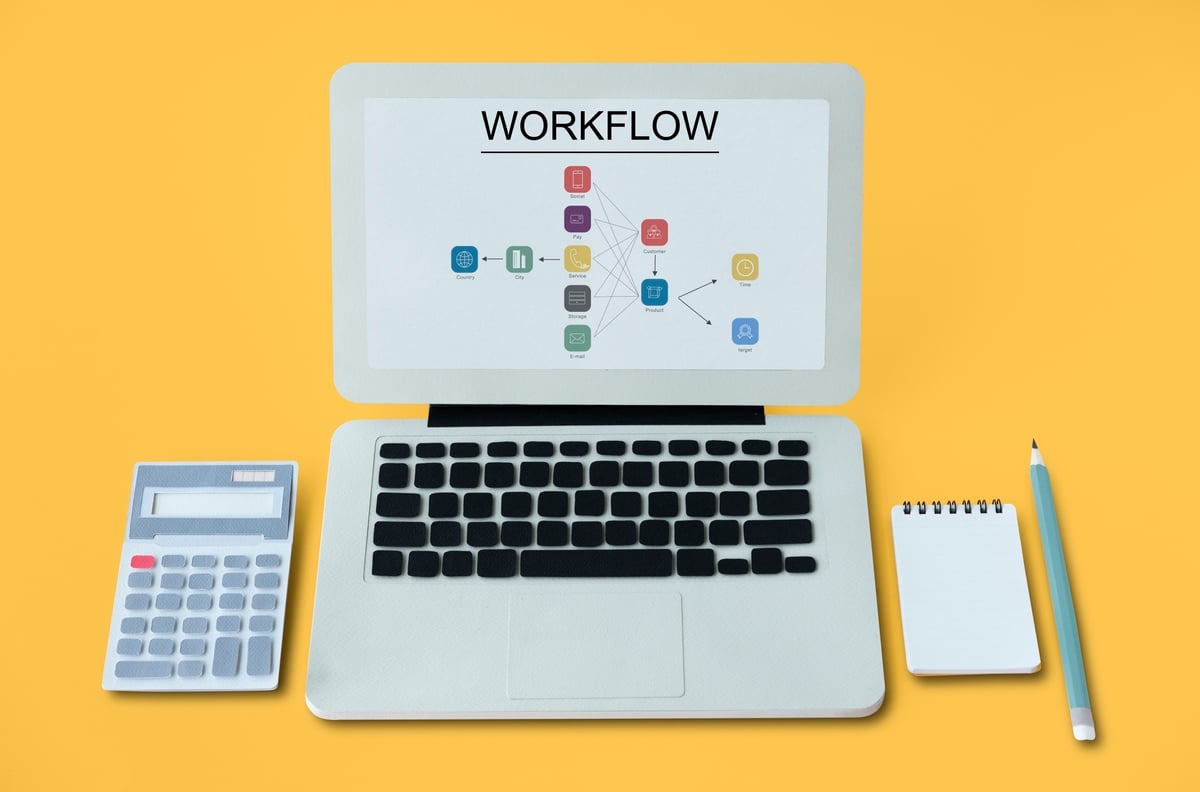
Workflow management has undergone a significant transformation, moving from rudimentary checklists and email chains to sophisticated, AI-powered platforms. Historically, managing projects and tasks relied heavily on manual methods, whiteboards, and spreadsheets, often leading to communication breakdowns, duplicated efforts, and a lack of real-time visibility. The advent of personal computing and networking in the late 20th century spurred the development of early project management software, primarily focused on scheduling and resource allocation. However, the early 2000s witnessed a paradigm shift with the rise of Agile methodologies in software development, necessitating tools that could support iterative development, continuous feedback, and flexible planning. This spurred the creation of platforms like Jira, tailored specifically for complex Agile workflows.
Concurrently, the broader business world began to recognize the benefits of structured workflows beyond IT. Tools like Asana and Wrike emerged to cater to marketing, operations, and creative teams, emphasizing visual task management, collaborative features, and streamlined approval processes. More recently, the proliferation of remote work and the demand for highly customizable solutions have led to the rise of flexible platforms like ClickUp and monday work management, which aim to serve as all-in-one work hubs. The integration of artificial intelligence and advanced analytics into these platforms further signifies the ongoing evolution, promising predictive insights, automated decision-making, and enhanced efficiency.
Key Challenges in Modern Project Execution
Without effective workflow management software, organizations frequently encounter a myriad of challenges that impede productivity and project success. These include:
- Lack of Visibility: Difficulty in tracking project progress, identifying bottlenecks, and understanding individual workloads.
- Communication Silos: Disconnected teams and departments leading to miscommunication, delayed information sharing, and duplicated efforts.
- Inefficient Handoffs: Manual processes and unclear responsibilities causing delays and errors between project stages.
- Resource Bottlenecks: Inability to accurately forecast and allocate resources, leading to over- or under-utilization of personnel.
- Missed Deadlines: Poor planning and tracking contributing to projects running over schedule and budget.
- Inconsistent Quality: Lack of standardized processes resulting in variable output quality and difficulty in maintaining compliance.
- Scalability Issues: Difficulty in adapting manual or rudimentary systems to accommodate growing team sizes and project volumes.
These challenges underscore the critical need for integrated and intelligent workflow management solutions that can provide a holistic view of operations, automate repetitive tasks, and foster seamless collaboration.
A Strategic Overview of Leading Workflow Management Solutions
The market offers a diverse array of workflow management software, each designed with specific strengths to address varied organizational needs. The following platforms represent top contenders, evaluated for their efficacy in different operational contexts.
1. Jira: The Cornerstone for Agile Software Development
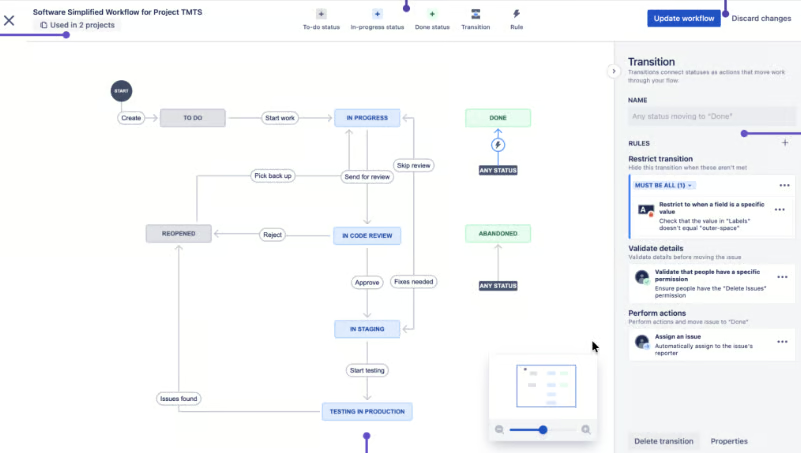
Jira, developed by Atlassian, has long been the gold standard for Agile software development teams. Its architecture is specifically designed to manage the intricacies of backlog refinement, sprint execution, and blocker resolution within a single, integrated environment. Jira’s strength lies in its ability to differentiate between various issue types—such as bugs, features, tasks, and incidents—each with customizable workflows. This allows development teams to precisely model their software delivery pipelines, moving items through Scrum or Kanban boards while linking them to broader strategic goals or release cycles.
The platform’s extensive ecosystem, boasting over 3,000 app integrations, enables seamless connectivity with a wide range of developer tools for testing, version control, and support. Administrators can tailor issue types and workflows to meticulously match how different categories of work progress from inception to completion. Dependency tracking is a crucial feature, providing teams with clear visibility into items that might impede a sprint or release, thus enabling proactive risk management. However, Jira’s deep customization capabilities often necessitate specialized administrative knowledge for initial setup, and its Agile-centric design can present a steeper learning curve for non-technical teams seeking more generalized business workflow management. Its monthly starting fee is approximately $9.05 per user.
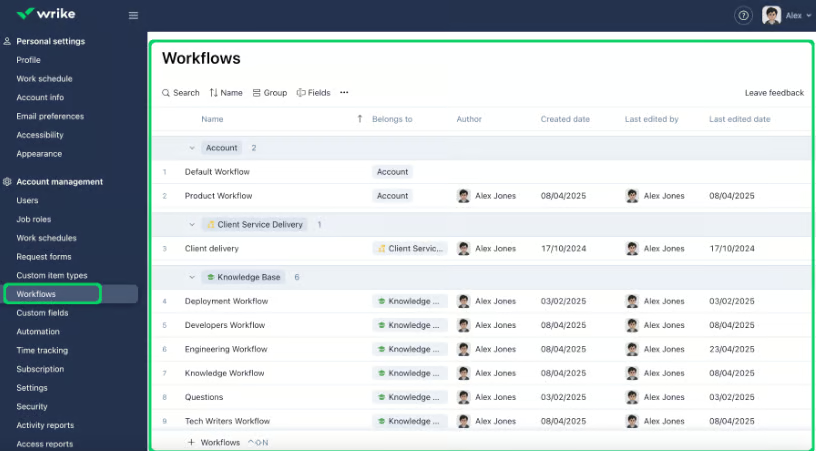
2. Wrike: Mastering Complex Approvals and Cross-Departmental Coordination
Wrike distinguishes itself as an ideal solution for projects that necessitate multiple approval stages prior to final delivery, making it particularly valuable for creative agencies, client services departments, and Project Management Offices (PMOs). When work originates from a request and requires extensive stakeholder sign-off, Wrike offers a cohesive system to manage these intricate steps within a single, trackable workflow, eliminating the need for separate approval logs.
A key feature for intake is Wrike’s dynamic request forms, which help teams gather all necessary details upfront. These forms support conditional logic, ensuring that each request type captures specific information—such as design specifications, client feedback, deadlines, or designated approvers—relevant to that particular workflow. Wrike also excels in approval management through its robust proofing tools, automation capabilities, and resource management functionalities. As teams route work to reviewers and monitor approval statuses, managers gain the ability to track timeline shifts and identify workload imbalances that could jeopardize project completion. While highly effective for complex processes, Wrike often demands a significant time investment for configuring forms, folders, and approval workflows before teams can fully leverage its potential. The monthly starting fee is around $10 per user.
3. Asana: Facilitating Seamless Team Coordination and Goal Alignment
Asana has established itself as a powerful tool for maintaining organized project coordination across diverse teams without imposing an overly technical interface. Its core strength lies in its intuitive design, leveraging standardized request forms, comprehensive project portfolios for monitoring, goal-setting features for business alignment, and insightful dashboards for work reporting.
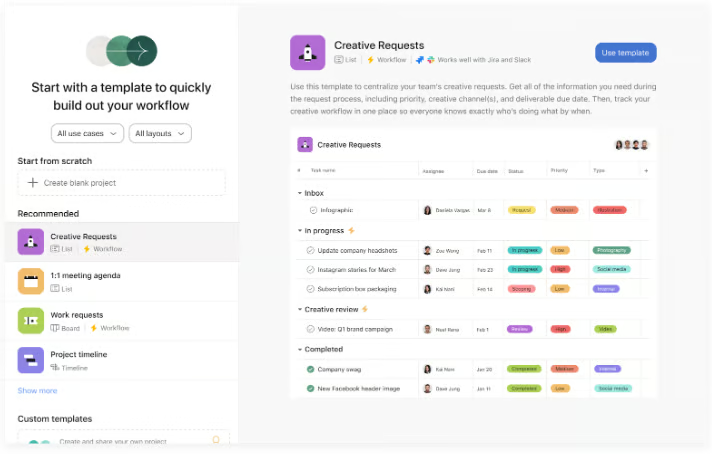
Asana excels when stakeholders require clear understanding of task ownership, current progress stages, and how individual contributions align with larger organizational objectives. Its capacity planning and workload management features enable managers to strategically compare staffing plans against project priorities, which is indispensable when project delivery hinges on the collaboration of multiple departments. While highly effective for general project coordination, Asana may be less suitable for teams requiring highly granular custom items, extremely intricate workflow structures, or extensive workspace-level configurations across numerous departments. AI features often require paid add-ons, and permissions can be limited on lower-tier plans. The monthly starting fee is approximately $13.49 per user.
4. ClickUp: Unlocking Unprecedented Workflow Customization
ClickUp is renowned for its exceptional versatility and deep customization options, positioning it as a leading platform for teams seeking to organize work around their existing, diverse processes. This AI-powered project management platform provides end-to-end workflow management through a rich feature set including advanced automations, multiple project views, integrated documentation (Docs), real-time chat, time tracking, and a connected search function.
The platform is particularly beneficial for organizations that desire a single, unified workspace for project planning, internal communications, and documentation. Custom fields allow teams to embed workflow-specific data directly into tasks, while customizable dashboards track project health and key performance indicators. Its automation capabilities reduce manual effort by updating task states through predefined rules rather than repetitive status changes. The primary challenge with ClickUp is its sheer breadth of options, which can overwhelm new users or lead to inconsistent setup if shared rules for configuration are not established. Performance issues have also been noted in some user reviews. ClickUp’s monthly starting fee is about $10 per user.
5. Smartsheet: Bridging the Gap for Spreadsheet-Centric Operations
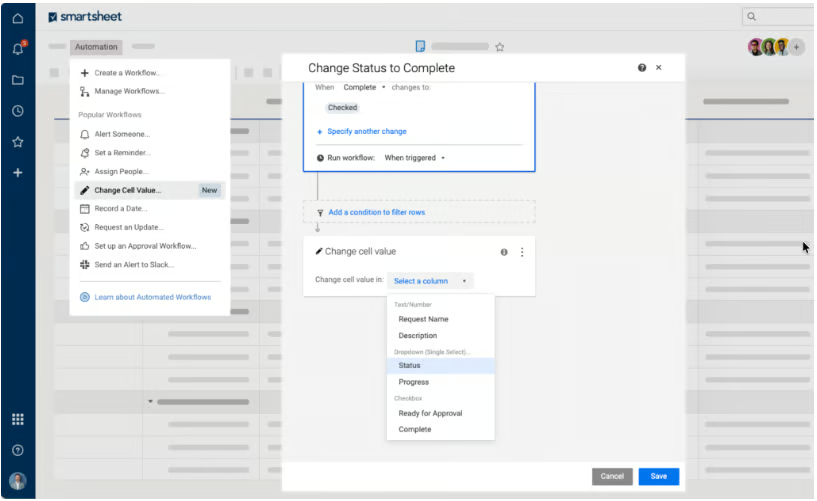
Smartsheet offers a unique proposition for teams accustomed to spreadsheet-based operations, providing a familiar grid-like interface while integrating advanced project controls not found in standard spreadsheets. Its workflow logic is built upon rows, fields, formulas, and reports, making it highly accessible for operations teams transitioning from tools like Microsoft Excel.
Teams can maintain their preferred spreadsheet-style tracking while gradually incorporating more sophisticated features such as forms, approval requests, comprehensive reports, and portfolio management as project complexity increases. Smartsheet is also at the forefront of AI integration, offering tools like Smart Assist, Smart Columns, an AI dashboard builder, and intelligent form fill. Higher-tier plans extend capabilities to include robust portfolio management and granular administrative controls, solidifying its position as an enterprise project management platform. However, for teams that find traditional spreadsheet interfaces less engaging or intuitive, Smartsheet’s design might feel less modern. Advanced automation often requires some formula knowledge, and resource management tools may incur additional costs. The monthly starting fee is approximately $12 per user.
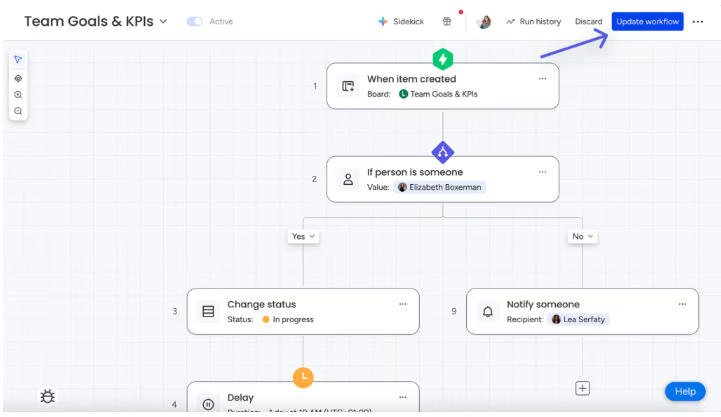
6. monday work management: Visualizing Workflows for Intuitive Oversight
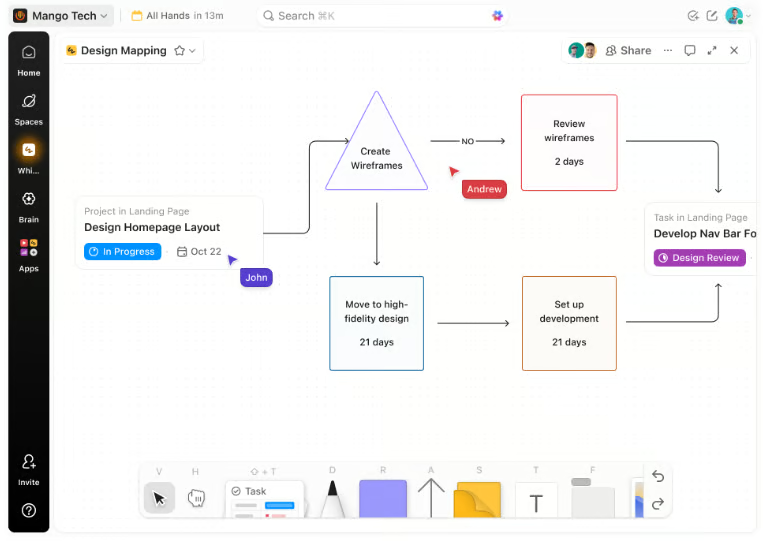
monday work management excels at presenting workflows in a highly visual, status-driven manner that business teams can quickly grasp. Its interactive boards are designed for visual thinkers who manage work through clear ownership, statuses, stages, and handoffs, offering an alternative to more formal project methodologies.
The platform’s color-coded columns provide immediate visual cues for project status, facilitate quick assignment of owners, and enable automation of routine updates. monday also integrates AI agents for recurring tasks, offering capabilities such as project monitoring, risk analysis, and automated status reporting. Its AI platform goes beyond basic automation, analyzing existing work patterns to suggest repetitive steps suitable for automation. Features like "Drift Detector" proactively flag broken workflows, helping teams identify process issues before missed handoffs or delayed tasks escalate into significant problems. The potential drawback is that highly visual boards can become cluttered if teams continuously add columns, automations, and interconnected workflows without strict administrative guidelines. Automation limits vary by plan, and the effectiveness of AI features is highly dependent on the initial workflow setup. The monthly starting fee is around $12 per user.
7. Notion: Integrating Knowledge Management with Project Execution
Notion offers a distinctive approach by seamlessly blending project management tasks with the documents, wikis, and knowledge pages essential for project context. This integration allows teams to keep plans, decisions, documentation, and task tracking consolidated, which is invaluable when project execution relies heavily on contextual information, research, specifications, and meeting notes.
As a versatile note-taking and organizational tool, Notion shines when project execution is deeply intertwined with a rich knowledge base. Its robust database capabilities can capture intricate project details in a centralized location, while dependency tracking helps teams visualize and manage task prerequisites. Any single page within Notion can be transformed into a project roadmap, a detailed project brief, or a dynamic task database, offering unparalleled flexibility. However, teams require a dedicated effort to configure layouts, databases, and views to optimize the workspace for effective project tracking. Native reporting features are limited, and enterprise governance requires careful administrative planning. Notion’s monthly starting fee is approximately $12 per user.
8. Trello: Simplifying Kanban for Agile Simplicity
Trello maintains a strong focus on Kanban views, ensuring workflow management remains simple and intuitive, particularly for Agile teams. Its iconic board layout is exceptionally well-suited for lightweight processes where the primary concern is to quickly ascertain whether work is pending, active, blocked, or completed.
Teams can effortlessly capture work items, move cards through defined stages, automate board actions, and incrementally add structure only when necessary. Trello’s Premium views extend its utility beyond a single Kanban board by introducing dashboard, timeline, table, calendar, and workspace-level views. Built-in automation ("Butler") reduces repetitive board actions, and card mirroring keeps related work synchronized across multiple boards. Trello becomes less practical for projects demanding advanced dependency management, sophisticated resource planning, or comprehensive portfolio reporting. Dashboards require paid plans, complex dependencies often need workarounds, and controls for very large teams can be limited. The monthly starting fee is about $6 per user.
Strategic Considerations for Workflow Management Software Selection
Choosing the optimal workflow management software is a critical strategic decision that can significantly impact an organization’s efficiency, collaboration, and overall success. Businesses must carefully weigh several factors:
- Defining Organizational Needs: A thorough assessment of current pain points, specific workflow complexities, team sizes, and the nature of projects (e.g., Agile, Waterfall, creative) is paramount. Understanding whether the priority is task tracking, complex approvals, resource management, or knowledge integration will guide the selection process.
- Scalability and Integration: The chosen solution should be able to scale with the organization’s growth and integrate seamlessly with existing tools (CRM, ERP, communication platforms) to avoid data silos and ensure a cohesive operational ecosystem.
- User Experience and Adoption: An intuitive and user-friendly interface is crucial for ensuring high adoption rates across all team members, regardless of their technical proficiency. A steep learning curve can hinder implementation and reduce the return on investment.
- Customization Capabilities: The ability to tailor workflows, fields, and views to match unique business processes is essential. However, excessive customization options can also lead to complexity if not managed properly.
- Reporting and Analytics: Robust reporting features are necessary for tracking performance, identifying bottlenecks, and making data-driven decisions. The level of detail and customization in reports should align with organizational needs.
- Cost-Benefit Analysis: Beyond the per-user fee, organizations must consider implementation costs, training requirements, potential add-ons, and the long-term value proposition in terms of increased efficiency and reduced operational overhead.
The Broader Impact: Enhancing Organizational Agility and Productivity
The adoption of advanced workflow management software extends beyond mere task tracking; it acts as a catalyst for broader organizational transformation. By providing clear pathways for work, automating mundane tasks, and centralizing communication, these tools significantly enhance operational agility. They empower teams to respond more rapidly to market changes, allocate resources more strategically, and deliver projects with greater predictability and quality.
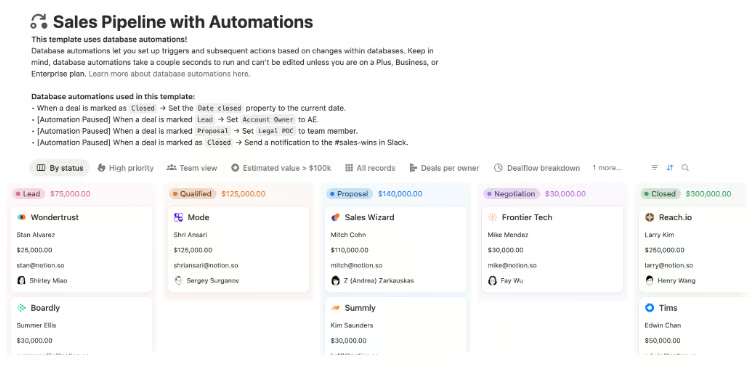
Furthermore, these platforms foster a culture of transparency and accountability, where every team member understands their role and how their contributions align with larger business objectives. The integration of AI and advanced automation features represents the future, promising to further streamline processes, predict potential issues, and free up human capital for more strategic and creative endeavors. As businesses navigate an increasingly complex and competitive global landscape, the strategic deployment of workflow management software will remain a cornerstone of sustained productivity and innovation.
Conclusion: Empowering Modern Workforces
The journey to find the ideal workflow management software is deeply personal to each organization, reflecting its unique operational rhythm and strategic ambitions. From Jira’s specialized power for Agile software development to Wrike’s mastery of complex approvals, Asana’s intuitive coordination, ClickUp’s boundless customization, Smartsheet’s spreadsheet-like familiarity, monday.com’s visual clarity, Notion’s integrated knowledge management, and Trello’s Kanban simplicity, the market offers a rich tapestry of solutions. The common thread among these leaders is their ability to empower teams, enhance collaboration, and drive efficiency, ultimately enabling businesses to thrive in the dynamic landscape of modern work. Selecting the right tool requires a clear understanding of an organization’s specific needs, a commitment to strategic implementation, and a vision for continuous operational improvement.
About the Author:
Marianne Sison is a technology analyst and B2B software writer specializing in project management software, collaboration platforms, and business productivity technology. Her reviews are based on hands-on testing, product demonstrations, vendor documentation, pricing analysis, and feature comparisons. For five years, she has written hundreds of buyer’s guides and software comparisons, including in-depth coverage of more than 20 project management platforms. Her work features leading vendors such as Atlassian Jira, monday.com, ClickUp, Asana, Smartsheet, Microsoft Project, Wrike, RingCentral, Zoom, Nextiva, and Microsoft Teams. She has also written extensively about Agile practices, AI features in business software, cloud communications, and collaboration technology. Marianne also writes a weekly project management newsletter for more than 18,000 subscribers, covering industry developments, software updates, and practical guidance for project professionals. Marianne’s work has been published by Project-management.com, TechnologyAdvice, TechRepublic, and Fit Small Business. She holds a Bachelor of Arts in Communication Arts from the University of the Philippines and continues to expand her knowledge of project management practices and business software through ongoing research and product evaluation.
Related posts:



Related Posts

PMI Unveils Major Overhaul of PMP Certification Exam for 2026, Signifying a New Era for Project Leadership
Project Managers at the Forefront of Accelerating Software Delivery with CI/CD Pipelines