


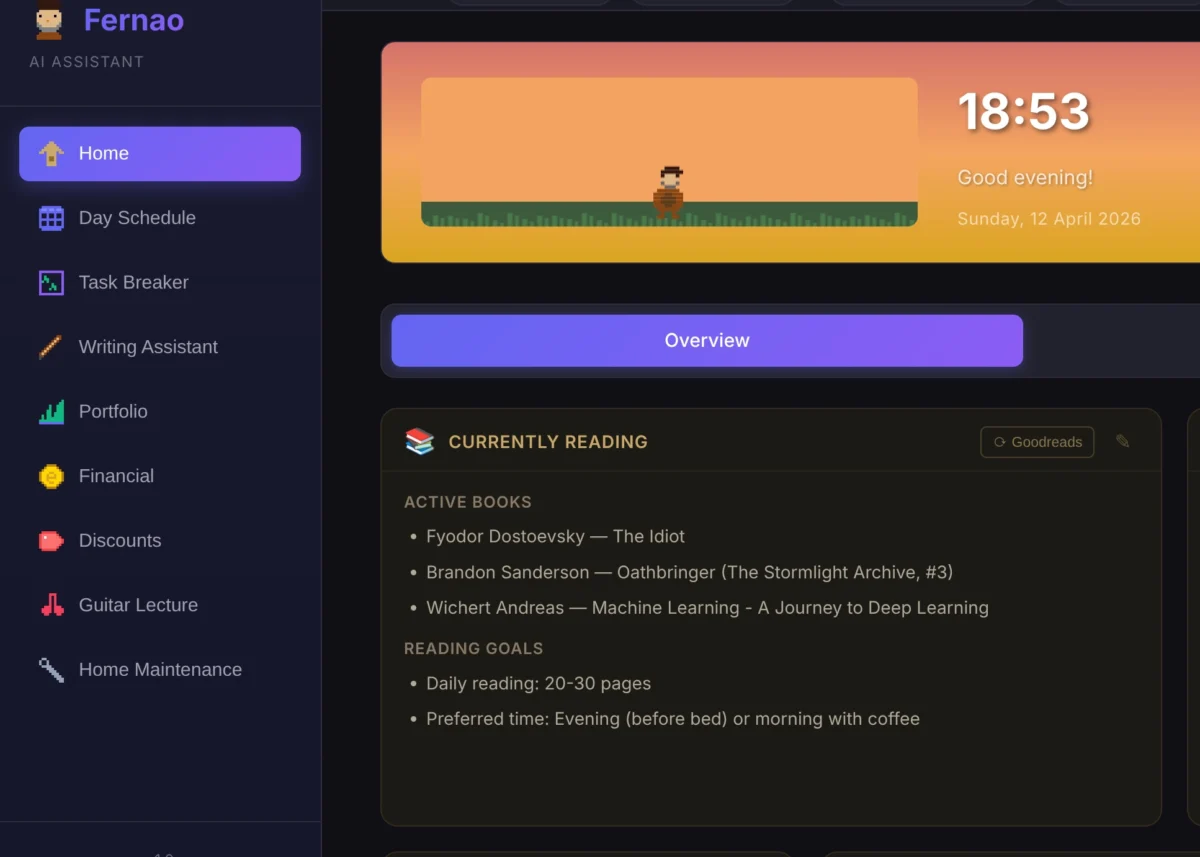
The journey into building a personalized AI agent, dubbed Fernão, continues with significant advancements in its functionality and architecture, marking a pivotal second phase in its development. This evolution addresses critical bottlenecks, introduces robust integrations, and unveils innovative features aimed at streamlining complex task management. The improvements highlight a broader trend towards users constructing their own digital ecosystems, a phenomenon with profound implications for software development and platform loyalty.

Revolutionizing Calendar Integration: From Inefficiency to Precision
A core challenge in Fernão’s initial development revolved around its calendar integration. The previous method, reliant on the iCalendar (ICS) format, proved to be an architectural Achilles’ heel. ICS, while ubiquitous, lacks native filtering capabilities. This meant that Fernão was compelled to download an entire calendar’s worth of events for every request, only to then filter for the specific meetings or tasks relevant to the user. This process, akin to acquiring an entire library to find a single sentence, was not only inefficient but also prohibitively slow, often taking up to five minutes per retrieval.
The architectural limitations of ICS became an insurmountable barrier to optimization. Recognizing this, the development team sought a more dynamic and efficient solution. The breakthrough came with the integration of Google Calendar’s API. This API offers native filtering, allowing Fernão to retrieve only the necessary event data. This fundamental shift dramatically improved performance, slashing the schedule generation time from nearly five minutes to an impressive twenty seconds.

The transition to the Google Calendar API necessitated a comprehensive refactoring of the surrounding logic. The updated function, get_events_for_date, now elegantly handles event retrieval. It prioritizes the API for its speed and filtering capabilities, while retaining ICS as a fallback mechanism in case of API unavailability or failure.
def get_events_for_date(target_date=None, use_api=True):
    """
    Fetches events for a specific date from Google Calendar.
    Tries API first (if use_api=True), falls back to ICS if API fails.

    Args:
        target_date: datetime.date object for the target day. If None, uses today.
        use_api: If True, try Google Calendar API first. If False, use ICS only.

    Returns:
        List of event dictionaries.
    """
    if use_api and GCAL_API_AVAILABLE:
        print("[GCal] Attempting to use Google Calendar API...")
        try:
            events = get_events_for_date_api(target_date)
            if events is not None:
                print(f"[GCal] Successfully fetched len(events) events via API")
                return events
            else:
                print("[GCal] API returned None. Falling back to ICS...")
        except Exception as e:
            print(f"[GCal] API failed with error: e")
            print("[GCal] Falling back to ICS...")

    # Fallback to ICS
    print("[GCal] Using ICS feed method...")
    return get_events_for_date_ics(target_date)
The core API fetching logic, encapsulated in get_events_for_date_api, demonstrates a sophisticated approach to data retrieval. It establishes a connection to the Google Calendar service, determines the precise time range for the target date, and queries specified calendars (defaulting to the primary calendar if none are explicitly defined). The function is designed to handle potential network timeouts during API calls by temporarily adjusting the default socket timeout, ensuring resilience.

def get_events_for_date_api(target_date=None):
    """
    Fetches events for a specific date from Google Calendar using the Calendar API.

    Args:
        target_date: datetime.date object for the target day. If None, uses today.

    Returns:
        List of event dictionaries, or None if API call fails.
    """
    service = get_calendar_service()
    if not service:
        return None

    day_start, day_end, target_date, tz_name, local = _get_local_time_range(target_date)

    print(f"n[GCal API] Fetching events for target_date.strftime('%Y-%m-%d')")
    print(f"  Timezone: tz_name")

    # Get calendar IDs from environment, or use primary
    calendar_ids_str = os.getenv('GCAL_CALENDAR_IDS', '')
    if calendar_ids_str:
        calendar_ids = [cid.strip() for cid in calendar_ids_str.split(',')]
    else:
        calendar_ids = ['primary']

    all_events = []

    # Fetch from each calendar
    for calendar_id in calendar_ids:
        try:
            print(f"[GCal API] Fetching from calendar: calendar_id")

            # Call the Calendar API with timeoutlobally
            old_timeout = socket.getdefaulttimeout()
            socket.setdefaulttimeout(10)

            try:
                events_result = service.events().list(
                    calendarId=calendar_id,
                    timeMin=day_start.isoformat(),
                    timeMax=day_end.isoformat(),
                    singleEvents=True,
                    orderBy='startTime'
                ).execute()
            finally:
                socket.setdefaulttimeout(old_timeout)

            events = events_result.get('items', [])
            print(f"[GCal API] Found len(events) event(s) in calendar_id")

            # Parse events
            for event in events:
                # Get start time
                start = event['start'].get('dateTime', event['start'].get('date'))
                end = event['end'].get('dateTime', event['end'].get('date'))

                # Parse datetime
                if 'T' in start:  # DateTime
                    start_dt = datetime.fromisoformat(start.replace('Z', '+00:00'))
                    end_dt = datetime.fromisoformat(end.replace('Z', '+00:00'))

                    # Convert to local timezone
                    start_local = start_dt.astimezone(local)
                    end_local = end_dt.astimezone(local)

                    start_str = start_local.strftime("%H:%M")
                    end_str = end_local.strftime("%H:%M")
                else:  # All-day event
                    start_str = "00:00"
                    end_str = "23:59"

                all_events.append(
                    "title": event.get('summary', 'Untitled Event'),
                    "start": start_str,
                    "end": end_str,
                    "location": event.get('location', ''),
                    "description": event.get('description', '')
                )

        except Exception as e:
            print(f"[GCal API] Error fetching from calendar_id: e")
            continue

    # Sort by start time
    all_events.sort(key=lambda x: x["start"])

    print(f"[GCal API] Total events: len(all_events)")
    return all_events
This refined approach not only enhances speed but also represents a significant architectural improvement, laying a more robust foundation for future enhancements.
Expanding Functionality: Task Management and Integration
Beyond the foundational improvements to calendar access, Fernão has seen the addition of substantial new features, significantly broadening its utility. Users can now mark tasks as completed directly within the agent’s schedule view. Crucially, this action is seamlessly synchronized with Microsoft To-Do, ensuring that task status is consistently updated across platforms. This integration bridges the gap between task planning and execution, offering a more fluid workflow.

The implications of such cross-platform synchronization are far-reaching. It fuels the vision of users constructing personalized "personal operating systems," curating workflows from a mosaic of preferred tools. As integration becomes more fluid and features become replicable, user loyalty to monolithic platforms may wane, favoring flexibility and customization. This trend poses a strategic challenge for software companies, potentially necessitating open API policies to maintain user engagement.
Introducing the Task Breaker: Deconstructing Complexity
A novel feature, inspired by user feedback, is the "Task Breaker." This module is designed to address the common challenge of overwhelming, large-scale tasks by deconstructing them into smaller, more manageable subtasks. The Task Breaker operates on a clear workflow: a user inputs a complex task, provides contextual information, and specifies a target completion timeframe. Fernão then analyzes this input and generates a series of actionable subtasks, each estimated to take approximately 20 minutes.

The Task Breaker’s interface is designed for intuitive interaction, featuring a dedicated module within the sidebar. When a user encounters a significant undertaking, such as "Project Documentation at DareData," they can leverage this feature. This particular task, aimed at consolidating internal company knowledge within Notion, involves auditing, content creation, and governance decisions, a multi-faceted endeavor requiring meticulous planning.
To illustrate its application, a user might provide the following context and parameters to the Task Breaker:

I’m currently building our Knowledge Hub in Notion. Here’s the current structure of Notion and Departments:

# DareData Hub

## Handbook for Network Members

[DareData Network Member Handbook ]

## Teams

### Sales & Partnerships

### Marketing (Brand and Gen-OS)

### Finance

### Delivery

[Tech Specialists]

[Principals]

[Account Managers]

I’ll need to:
- Go Through Every department and create the pages that make sense (search the web for more context on what DareData is if you need ideas of the pages I need to create on every department or use your knowledge on what definitely needs to be documented in a 130 people B2B company).
- Make sure that every page has an Owner
- Revisit the Suggestions recorded by my team in the suggestions, I can probably pick one or two suggestions every day
- Add some departments that are not in there: Admin, Core Members, Finance, Product

I have around 30 minutes to 1 hour to work every day and want to complete this project by 7 March 2026.
Upon receiving this input, Fernão’s Task Breaker analyzes the information and generates a detailed breakdown. The generated subtasks are designed to be actionable and time-bound, ensuring consistent progress.
The output typically includes a markdown list of subtasks, specifying their estimated duration and a projected due date, facilitating effective project management. For example:

- Project Documentation at DareData - Research and outline pages for Sales & Partnerships department (20 min) [Due: 2026-02-25]
- Project Documentation at DareData - Identify and assign owners for Sales & Partnerships pages (20 min) [Due: 2026-02-26]
- Project Documentation at DareData - Review and incorporate 2 suggestions from the team for Sales & Partnerships (20 min) [Due: 2026-02-27]
Users can then review these generated tasks and submit them to their Microsoft To-Do list, specifying the desired destination list for organization. The flexibility to adjust parameters, such as task duration or the inclusion of emojis (though often removed due to LLM-generated code aesthetics), allows for fine-tuning the output to individual preferences.
The prompt engineering for the Task Breaker is a critical component, continuously refined through real-world usage. The current prompt emphasizes the AI’s role as a productivity expert, tasked with breaking down complex tasks into ~20-minute actionable subtasks, adhering to specific rules for specificity, logical order, and scheduling.

name: task_breakdown
description: Break down a task into 20-minute actionable subtasks
max_tokens: 4096

variables:
- task_name
- task_context
- current_date
template: |
You are a productivity expert helping break down complex tasks into manageable 20-minute chunks.

**CURRENT DATE:** current_date
**TASK TO BREAK DOWN:**
task_name
**CONTEXT PROVIDED BY USER:**
task_context

**YOUR JOB:**

Break this task into specific, actionable subtasks that can each be completed in approximately 20 minutes.
**RULES:**
1. Each subtask should be concrete and actionable (starts with a verb)
2. Each subtask should take ~20 minutes (can be 15-25 min, but aim for 20)
3. Subtasks should follow a logical order
4. Be specific - avoid vague tasks like “work on X”
5. If the task is already small enough, you can create 1-3 subtasks
6. If it’s large, create > 5 subtasks
7. Consider the context provided - use it to make subtasks relevant and specific
8. **SCHEDULING:** Based on the user’s context (e.g., “every other day”, “weekends only”), suggest a specific Due Date for each task starting from the Current Date.

**OUTPUT FORMAT:**

Return ONLY a markdown list of subtasks in this format:
- task_name - [Subtask description] (20 min) [Due: YYYY-MM-DD]

Example:
- task_name - Create project repository (20 min) [Due: 2026-02-13]
- task_name - Configure CI/CD pipeline (20 min) [Due: 2026-02-15]
Do NOT include any other text or explanations. Just the list.
Future Development and Broader Implications
The development of Fernão is an ongoing process, with several new modules currently in development. These include:
- Text Summarization Module: To condense lengthy documents and articles into concise summaries.
- Meeting Notes Generator: To automatically transcribe and summarize meeting discussions.
- Code Reviewer: To assist in identifying potential issues and suggesting improvements in code.
- Personal Knowledge Base Integration: To connect and leverage a user’s personal knowledge repository.
The evolution of Fernão exemplifies a significant shift in how individuals interact with technology. As AI agents become more sophisticated and integrated, they are poised to empower users to construct highly personalized digital environments. This trend not only enhances individual productivity but also raises fundamental questions about the future of software ecosystems and the strategic imperatives for companies aiming to thrive in an increasingly interconnected and user-centric digital landscape. The ability for users to seamlessly integrate and orchestrate their tools signifies a move towards a more modular and adaptable digital existence, where platform loyalty is earned through flexibility and value, rather than enforced through lock-in.







Comments (0)